Updated Website Widget
What changed
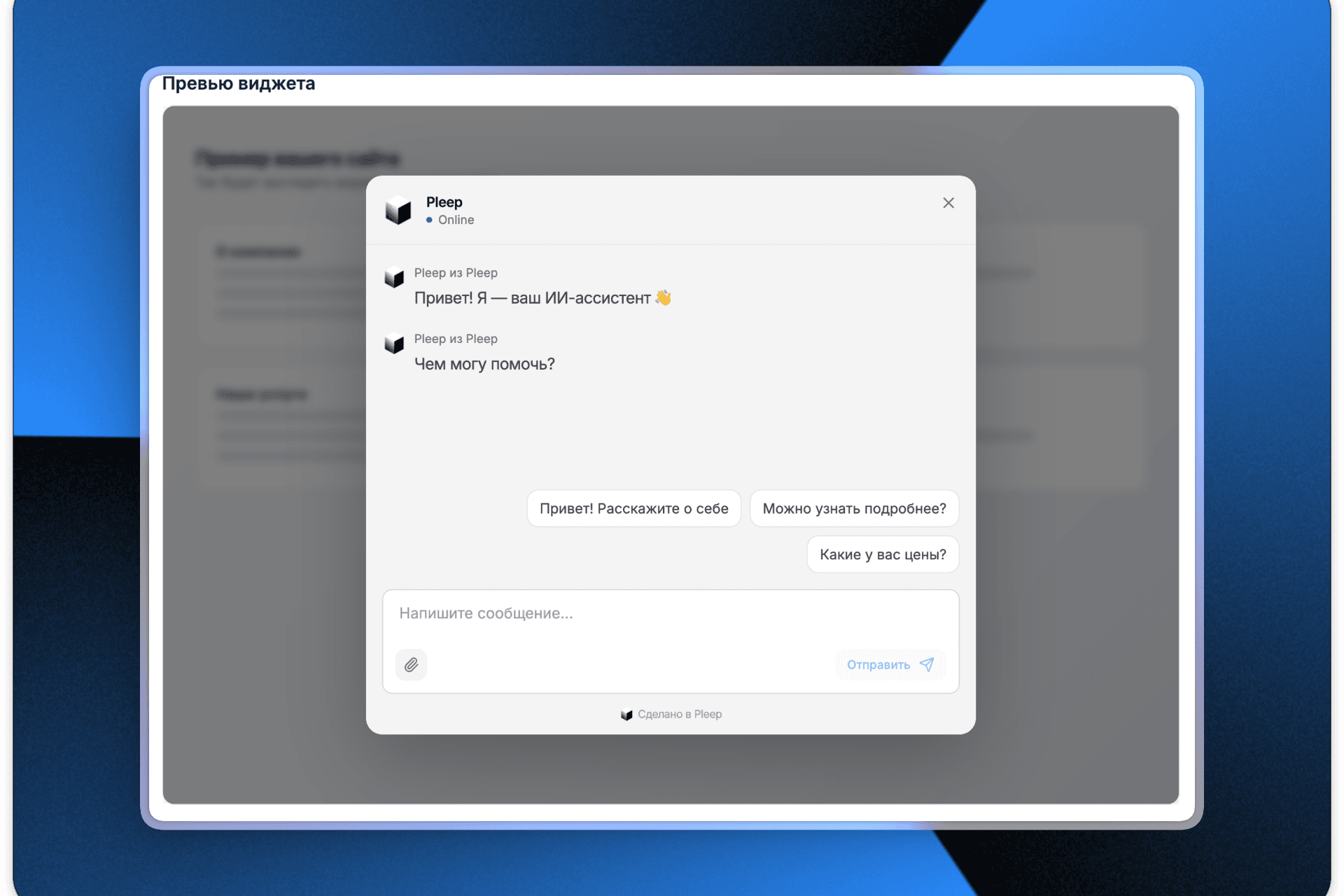
The widget used to be a simple button in the corner with limited settings. Now you can choose the display type, customize the appearance, and prepare your customer for the conversation before they even send their first message.
New features
Two widget types to choose from
Choose how the widget appears on your website:
Corner button — a compact button in the corner of the page (the classic option) Center panel — an input panel at the bottom center of the page (more prominent, great for landing pages)
The position is configurable right in the interface, and you can see how it looks in the preview immediately.
Welcome messages
The widget can now automatically show a greeting from your AI agent when it opens:
Add one or more welcome messages They appear at the start of every new conversation They help warm up the customer and explain who they're talking to
Example:
- "My name is Maria — I'm an AI sales agent built on Pleep"
- "Happy to answer your questions :) by the way — you can create an AI agent like me for your company in just 5 minutes"
Suggested questions
Add buttons with popular questions that customers can ask with a single click:
"How is Pleep different from chatbots?" "How does this help with sales?" "What are the prices?"
This lowers the barrier to entry — the customer doesn't need to think of what to write. They see ready-made options and click on the question that interests them.
Appearance customization
Full control over the widget's look and feel:
Button text — change the default "Have questions? AI is here" to your own Logo — upload your company logo or AI agent avatar Name next to the logo — add the AI agent's name or your company name
Real-time preview
No need to publish changes to see the result. The widget preview updates right in the settings interface — you can see exactly how the widget will look on your website.
Simple installation
The process remains just as simple:
- Configure the widget in the "Extensions" section
- Copy the generated code
- Paste it into the <body> of your website
The widget works on all popular website builders: Tilda, Wix, Squarespace, Framer, Webflow, WordPress, and any HTML website.
What this means for you
More conversions — suggested questions lower the barrier to starting a conversation Better first impression — welcome messages explain to the customer who they're talking to Branded widget — a logo and name build trust Flexibility — two widget types for different use cases and website types Time savings — see the result in the preview before publishing
How to get started
- Go to the "Extensions" section
- Choose the widget type (corner button or center panel)
- Set up welcome messages and suggested questions
- Upload a logo and customize the text
- Copy the code and paste it into your website
If the widget is already installed on your website, simply update the code and all new settings will apply automatically.
If you have any questions about setup, reach out to our support team — we'll help with the integration.
Team Pleep